Purdue students riding VEO scooters got too little real-time feedback at critical moments, so I turned our team’s research into design directions for active ride feedback, trip completion and issue recovery.

Role
UX Research
Product Design
Timeline/Duration
4 weeks
Team
2 UX Designers
Scope
Mobile App
Campus Mobility
Tools
Figma
Google Doc
ChatGPT
Redesigning How Students Navigate Campus Mobility
Shared micro-mobility services such as VEO scooters are widely used across college campuses, giving students a fast way to move between classes. However, speed and convenience also create safety and usability issues when riders encounter unclear parking zones, restricted areas, slow-speed zones, and limited real-time feedback.
This project began with team-wide research into the campus scooter experience. I focused on translating the research into design directions for active ride feedback, trip completion, and issue recovery.
Critical Ride Moments Lacked Clear Feedback
Students at Purdue rely on VEO scooters for fast campus mobility, especially under time pressure. However, the current experience does not provide enough clear, real-time feedback during critical moments of riding and trip completion.
As a result, riders may enter restricted zones, react too late to system constraints, struggle to identify legal parking areas, or rely on their phones while riding.
Investigating How Students Ride, Park, and Navigate Campus
To understand how students used VEO scooters in real campus conditions, we combined campus observation, student interviews, and journey mapping. This helped us identify where the ride experience broke down across planning, riding, parking, and issue recovery.
Campus Observation
We observed how riders moved through busy campus paths, sidewalks, bike lanes, parking zones, and construction-heavy areas.
Student Interviews
We interviewed students to understand their motivations, frustrations, and tradeoffs when using scooters under time pressure.
Journey Mapping
We mapped the end-to-end ride experience to identify where confusion, unsafe behavior, or system feedback gaps appeared.
Identifying Patterns Across Safety, Parking, and Usability
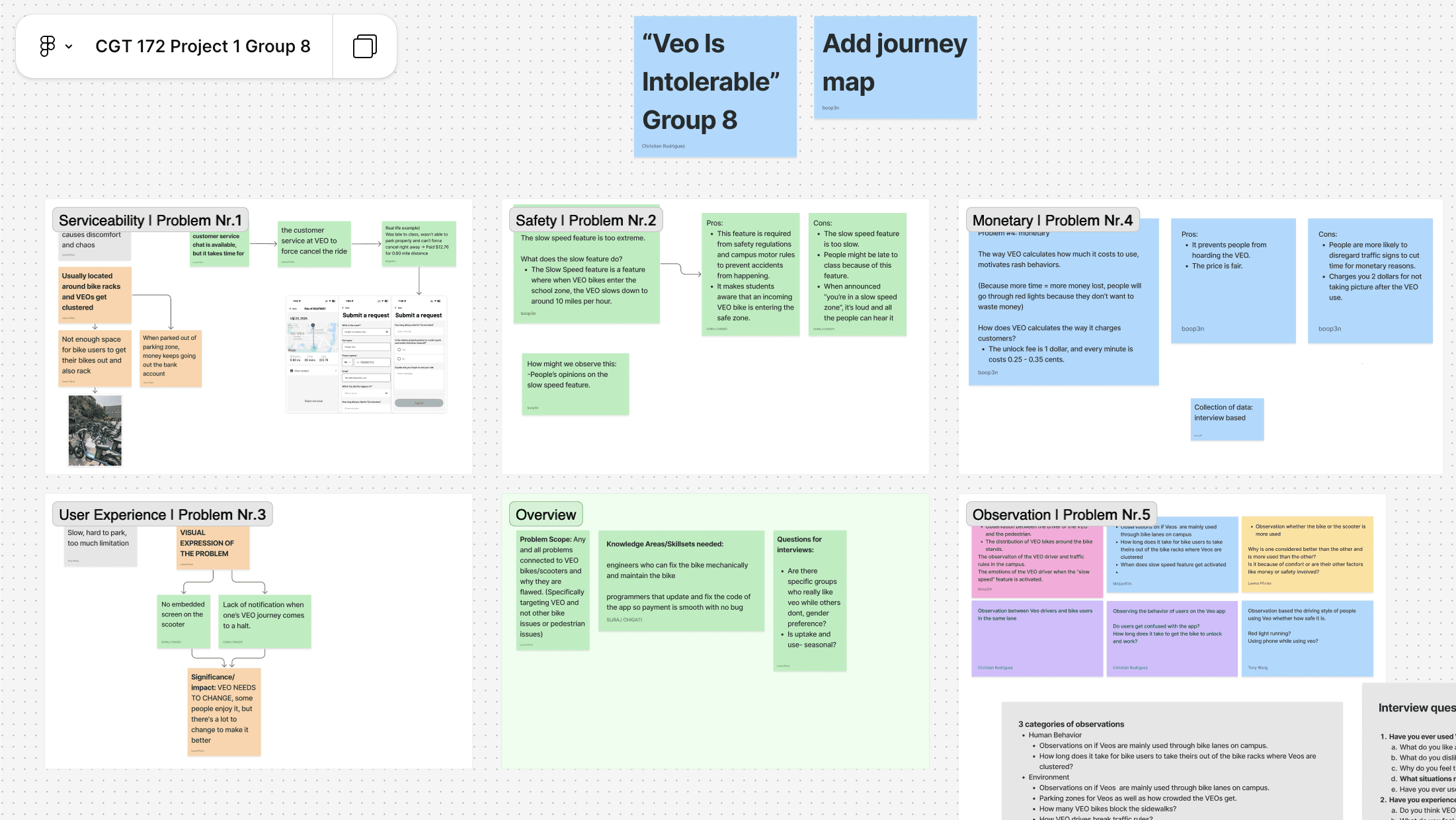
After collecting observation notes and interview takeaways, we organized the research in FigJam to identify recurring patterns around serviceability, safety, pricing, and user experience.
Finding Friction Across the Rider Journey
We mapped the VEO ride experience across five stages to understand what users were trying to accomplish, what actions they took, what they were thinking, and where friction appeared. This helped us identify opportunities for clearer pricing, ride guidance, parking feedback, and issue recovery.
Planning the ride
Users looked for available scooters around campus and compared VEO against walking or using Uber. The main friction was uncertainty around pricing and how the service worked.
Starting the ride
Users downloaded the app, created an account, and scanned the QR code. Friction appeared when users were unsure how to find scooters, unlock them, or begin smoothly.
Active ride
Users rode toward their destination while checking cost, route conditions, and slow-speed zones. This stage revealed the need for clearer alerts before problems happened.
Ending the ride
Users looked for nearby parking zones and checked whether the ride ended correctly. Parking became frustrating when approved areas felt far, unclear, or crowded.
Issue recovery
When parking or ride issues occurred, users needed support from the app. The main friction was slow response time and uncertainty about cost or next steps.

“I go as fast as I can when I'm late — even if it's unsafe.”
Speed Over Safety
Students prioritized getting to class quickly, even when the ride environment felt unsafe.
Unsafe but Necessary
Many riders still relied on scooters because they saved time between classes.
Parking Frustration
Ending a ride became frustrating when legal parking areas were unclear, crowded, or far from the destination.

Designing for Awareness, Decisions, and Recovery
During Ride
Live alerts, ride metrics, zone awareness
Decision Moments
Context-aware warnings and parking guidance
Recovery
Support flow for issues during or after a ride
Making Ride Feedback Timely, Clear, and Actionable
After defining the main feedback gaps, I mapped the core ride flow and translated key moments into wireframes before refining the final interface.


Core Product Improvements
Live Alerts
Real-time audio and visual alerts warn riders about traffic, pedestrians, weather, and restricted areas before they enter critical zones.

Ride Status + Feedback
Ride metrics such as time, distance, cost, and active conditions remain visible so users can understand their ride without repeatedly checking their phone.

Support Flow
A simplified issue-reporting flow lets riders report problems such as time issues, breakdowns, construction, or traffic without typing long explanations.

Interface Choices

Rounded UI
Made the interface feel approachable and consistent with modern mobility apps.
Bright Mode
Helped maintain visibility in outdoor campus environments.
Color-Coded Alerts
Helped riders quickly distinguish different types of feedback.
Dark Alert Overlay
Focused attention during critical warnings.
What I Learned
Behavior is contextual
Rider decisions were shaped by urgency, campus infrastructure, and the feedback available during the ride.
Feedback needs timing
Mobility interfaces need to communicate constraints before users reach a problem point.
Support should be lightweight
Issue recovery needs to be simple enough to use during stressful or time-sensitive moments.